Apple just flipped the switch. Starting today, you can add your United States passport to Apple Wallet and use it as a Digital ID at TSA checkpoints across more than 250 airports for in‑person identity checks during domestic travel. It feels familiar if you have ever added a card to Wallet, but it is your passport, so Apple built in extra checks.
Quick heads-up before we go any further. This is not a replacement for your physical passport. It will not work for international travel or at border control. Think of it as a convenient, TSA‑approved way to prove who you are when you fly within the US.
How to add passport to Apple Wallet
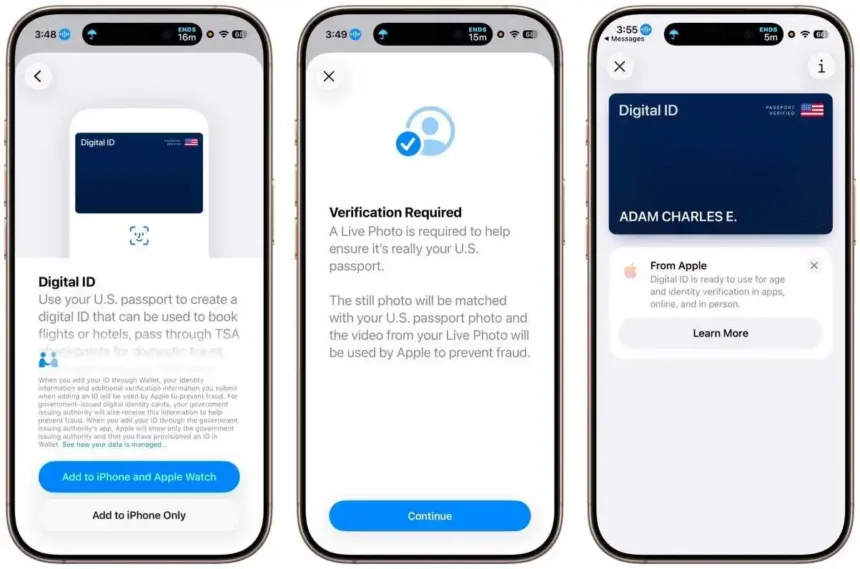
Setup is simple. Open Wallet, tap the plus button, and choose Digital ID. Scan the photo page of your passport. Your iPhone will ask you to hold it against the passport to read the embedded NFC chip. That chip scan confirms the data is real. You will snap a selfie and then follow a few on‑screen prompts with small head movements so Face ID can match you. It takes a minute or two. If the NFC scan feels finicky, hold the phone steady on the lower half of the passport for a beat.
Using it at the airport is even easier. Double‑click the side button or the Home button to bring up Apple Wallet and choose Digital ID. Hold your iPhone or Apple Watch near the identity reader. Approve with Face ID or Touch ID. You do not hand your phone to an agent, and you do not need to unlock or show your screen. Only the info needed for that TSA check is shared. That is it.
Privacy is the big promise here, and Apple says the Digital ID data is encrypted and stored only on your device. Apple cannot see when or where you present your ID, or what information you share. You stay in control, and the system only releases the specific fields the checkpoint requests. That level of control matters when you are using your phone as your ID at a busy security line.
Apple also says more acceptance is on the way. Beyond TSA, you will be able to use Digital ID with select businesses and organizations for identity and age verification in person, in apps, and online. That means things like buying age‑restricted items or checking in at a hotel could feel a lot smoother down the line.
A few practical notes from a traveler’s point of view. Bring your physical passport as backup, especially if you have connecting flights or plans that might change. Keep your iPhone updated to the latest iOS so you get the newest Wallet features and security patches. And if you prefer wearing your tech, Apple Watch works for presenting your Digital ID at supported readers, which is nice when your hands are full.
Apple introduced driver’s licenses and state IDs in Wallet back in 2022. This passport support follows the same playbook, only with that NFC chip scan added for extra authenticity. The result is a clean, quick experience that fits the way people already use their phones at the airport.
You can add your US passport to Apple Wallet today. TSA accepts it at 250 plus airports for domestic flights. It is fast, private, and you do not hand your phone over. Just remember, you still need the physical passport for international trips.
Also Read | Apple’s Next Siri May Quietly Run on Google’s Gemini AI
Source: Apple Official